
[Piolink] 부하분산(SLB) 설정
- 참고 사항
- 해당 테스트는 PAS-KS(가상화 이미지)에서 구성
- 어플라이언스 모델(PAS-K)와 설정 부분이 상이할 수 있음
부하분산(SBL) 설정 순서
- Heal-Check 생성 → Real 서버 등록 → SLB 생성
- Heal-Check : L4스위치 → 실서버에게 실시간 패킷을 발생시켜, Alive 상태 유지 한다. 패킷에는 능동과 수동 2가지 방식 존재
- Real 서버 등록 : 실서버의 정보를 등록 한다. 예) IP, Port 등
- SLB : 최소 2개 이상 RIP(실서버)를 그룹핑 하고, 로드밸런싱 조건과 nat-mode를 설정 한다.
네트워크 구성도 설명
- L4스위치는 가장 일반적인 단중화 인라인(Inline)구조
- L4스위치 WAN(eth1) 및 LAN(eth2) 인터페이스 분리
- IP대역 192.168.100.0/24 은 인터넷 용도로 사용
- IP대역 20.0.0.0/24은 서비스 용도로 사용
- SVR-01,SVR-01 서버는 apache 설치 후 포트 80 서비스 리슨
- Ubuntu 스태틱 라우팅 설정 커맨
*## 라우팅 설정 ##*
route add -net x.x.x.x netmask x.x.x.x gw x.x.x.x

*## 라우팅 삭제 ##*
route del -net x.x.x.x netmask x.x.x.x gw x.x.x.x
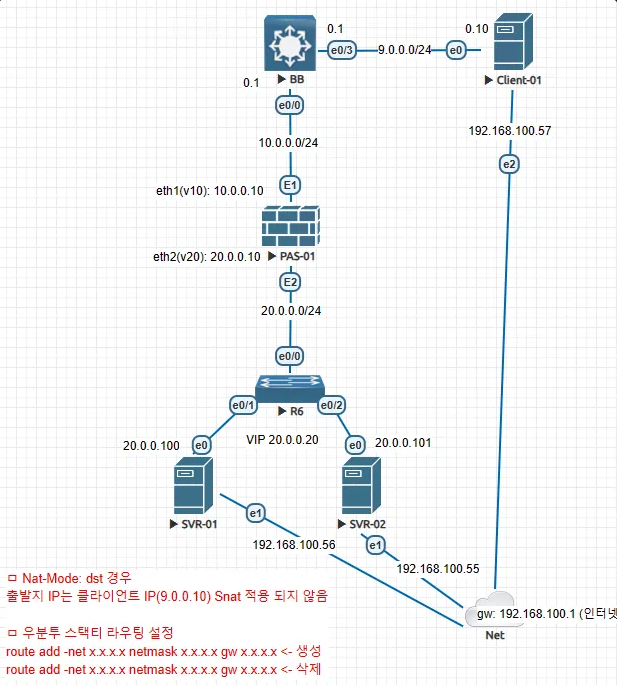
설정 부문
0. 전체 설정(Config)
PAS-01# show run
!
! Application switch configuration (KS-v2.2.5.2.0)
! 2024/02/24 02:59:42
!
! Hostname configuration
!
hostname PAS-01 *# 호스트 네임*
!
! Timezone configuration
!
timezone UTC+09:00
!
! Env configuration
!
env update_timeout_unreplied_rst disable
env tcp_flag_validation disable
env failed_login_max_count 5
env authenticate_config_mode disable
env checksum enable
env sort-compare length-first
env invalid_tcp_forwarding accept
env mangle_arp_source_mac enable
env minimum_password_length 9
env ipv6_defrag_off disable
env use_mgmt_ip_svc disable
env failed_login_unlock_time 300
env reply_with_stored_mac disable
env check_expired_password disable
env use_vlan_ip_svc disable
!
! User configuration
!
user root
  log enable
  level superuser
  description "Root Account"
  apply
user swadmin
  log enable
  level superuser
  description "Default User"
  apply
!
! Arp configuration
!
arp proxy-arp disable
arp timeout 30
arp proxy-delay 0
arp locktime 100
!
! Port configuration
!
port eth1 jumbo-frame disable
port eth1 description "## Up Link ##"
port eth2 jumbo-frame disable
port eth2 description "## Down Link ##"
port eth3 jumbo-frame disable
port eth4 jumbo-frame disable
port mgmt jumbo-frame disable
!
! Vlan configuration
!
vlan v10 port eth1 # vlan 언태그
vlan v20 port eth2 # vlan 언태그
vlan v30 port eth3 vid 30 # vlan 태그(테스트 용도)
!
! Interface configuration
!
interface v10 status up
interface v10 mtu 1500
interface v10 adv-send-advert enable
interface v10 adv-default-lifetime 1800
interface v10 min-rtr-adv-interval 198
interface v10 max-rtr-adv-interval 600
interface v10 adv-cur-hop-limit 64
interface v10 adv-reachable-time 0
interface v10 adv-retrans-timer 0
interface v10 ip 10.0.0.10/24
interface v10 rpf default
interface v10 arp-ignore 0
interface v10 arp-announce 0
interface v20 status up
interface v20 mtu 1500
interface v20 adv-send-advert enable
interface v20 adv-default-lifetime 1800
interface v20 min-rtr-adv-interval 198
interface v20 max-rtr-adv-interval 600
interface v20 adv-cur-hop-limit 64
interface v20 adv-reachable-time 0
interface v20 adv-retrans-timer 0
interface v20 ip 20.0.0.10/24
interface v20 rpf default
interface v20 arp-ignore 0
interface v20 arp-announce 0
interface v30 status up
interface v30 mtu 1500
interface v30 adv-send-advert enable
interface v30 adv-default-lifetime 1800
interface v30 min-rtr-adv-interval 198
interface v30 max-rtr-adv-interval 600
interface v30 adv-cur-hop-limit 64
interface v30 adv-reachable-time 0
interface v30 adv-retrans-timer 0
interface v30 rpf default
interface v30 arp-ignore 0
interface v30 arp-announce 0
interface mgmt status up
interface mgmt mtu 1500
interface mgmt adv-send-advert enable
interface mgmt adv-default-lifetime 1800
interface mgmt min-rtr-adv-interval 198
interface mgmt max-rtr-adv-interval 600
interface mgmt adv-cur-hop-limit 64
interface mgmt adv-reachable-time 0
interface mgmt adv-retrans-timer 0
interface mgmt rpf default
interface mgmt arp-ignore 1
interface mgmt arp-announce 2
!
! Dns configuration
!
dns retry 2
dns timeout 2
!
! Logging configuration
!
logging
  buffer 50
  server-status disable
  level notice
  facility all
  apply
!
! Snmp configuration
!
snmp
  status disable
  load-timeout 60
  trap cold-start disable
  trap temperature disable
  trap power disable
  trap fan disable
  trap link-up disable
  trap link-down disable
  trap cpu disable
  trap management-memory disable
  trap packet-memory disable
  trap log_storage disable
  trap health-check disable
  trap failover disable
  apply
  exit
!
! Radius configuration
!
radius
  status disable
  port 1812
  retry 3
  timeout 3
  console disable
  ssh disable
  telnet disable
  web disable
  apply
!
! Ntp configuration
!
ntp
  status disable
  minpoll 4
  maxpoll 8
  apply
!
! Session-Timeout configuration
!
session-timeout
  generic 30
  icmp 10
  udp 10
  udp-stream 180
  tcp-syn-sent 20
  tcp-syn-recv 20
  tcp-established 3600
  tcp-fin-wait 20
  tcp-close-wait 20
  tcp-last-ack 20
  tcp-wait 20
  tcp-close 20
  tcp-unassured 20
  apply
!
! Health-Check configuration
!
health-check 1
  type tcp
  timeout 1
  interval 2
  retry 4
  recover 0
  status enable
  graceful-shutdown disable
  port 80
  half-open enable
  source-port-min 10000
  source-port-max 65535
  apply
  exit
!
! Gslb-Mode configuration
!
gslb-mode recursive-mode disable
gslb-mode forward-mode disable
gslb-mode zone-transfer-mode disable
!
! Real configuration
!
real 1
  rip 20.0.0.100
  name SVR-01
  rport 80
  priority 105
  weight 1
  interface v20
  preemption enable
  graceful-shutdown disable
  manual-resume disable
  max-connection 0
  upload-bandwidth 0
  download-bandwidth 0
  pool-size 10000
  pool-age 3600
  pool-reuse 100
  pool-srcmask 32
  surge-base-thr 0
  surge-upper 0
  status enable
  ip-ver ipv4
  health-check 1
  apply
  exit
real 2
  rip 20.0.0.101
  name SVR-02
  rport 80
  priority 0
  weight 1
  interface v20
  preemption enable
  graceful-shutdown disable
  manual-resume disable
  max-connection 0
  upload-bandwidth 0
  download-bandwidth 0
  pool-size 10000
  pool-age 3600
  pool-reuse 100
  pool-srcmask 32
  surge-base-thr 0
  surge-upper 0
  status enable
  ip-ver ipv4
  health-check 1
  apply
  exit
!
! Slb configuration
!
slb web-01
  status enable
  priority 50
  nat-mode dnat
  lb-method rr
  fail-skip none
  session-timeout-mode global
  session-reset none
  session-sync none
  hc-condition all
  vip 20.0.0.20 protocol tcp vport 80
  apply
  filter 1
    type include
    protocol tcp
    sip 0.0.0.0/0
    dip 20.0.0.20/32
    dport 80
    status enable
    apply
  sticky time 60
  sticky source-subnet 255.255.255.255
  keep-backup service disable
  keep-backup real disable
  real 1 rport 80
!   id 1, name SVR-01, rip 20.0.0.100, rport 80
  real 1 status enable
!   id 1, name SVR-01, rip 20.0.0.100, rport 80
  real 1 graceful-shutdown disable
!   id 1, name SVR-01, rip 20.0.0.100, rport 80
  real 2 rport 80
!   id 2, name SVR-02, rip 20.0.0.101, rport 80
  real 2 status enable
!   id 2, name SVR-02, rip 20.0.0.101, rport 80
  real 2 graceful-shutdown disable
!   id 2, name SVR-02, rip 20.0.0.101, rport 80
  apply
  session-timeout
    generic 30
    icmp 10
    udp 10
    udp-stream 180
    tcp-syn-sent 20
    tcp-syn-recv 20
    tcp-established 3600
    tcp-fin-wait 20
    tcp-close-wait 20
    tcp-last-ack 20
    tcp-wait 20
    tcp-close 20
    tcp-unassured 20
    apply
  exit
!
! Failover configuration
!
failover
  aaf-method disable
  delay-time 10
  session-sync status disable
  session-sync interval 100
  session-sync full-interval 30
  session-sync update live
  session-sync peer node2
  session-sync interface hc-retry 3
  ha
    status disable
    default-state master
    heartbeat-interval 10
    retry 3
    vmac enable
    apply
  apply
  exit
!
! Dhcp-Server configuration
!
dhcp-server
  status disable
  apply
  exit
!
! Dhcp-Relay configuration
!
dhcp-relay
  status disable
  option forward
  apply
!
! Backup configuration
!
backup
  server disable
  running-config disable
  apply
!
! Nat configuration
!
nat
  status disable
  apply
  exit
!
! Management-Statistics configuration
!
management-statistics
  default status enable
  default unit minute
  client_ip status disable
  client_ip interval 2
  client_ip max_client 10000
  apply
!
! Neighbor configuration
!
neighbor proxy-ndp disable
!
! Watch-System configuration
!
watch-system
  cpu threshold 90
  memory threshold 90
  log_storage threshold 90
  apply
!
! Router6 configuration
!
router6 advertisement-status disable
!
! Dual-Boot configuration
!
dual-boot next-boot-image current
!
! Tacacs-Plus configuration
!
tacacs-plus
  timeout 3
  service shell
  ssh disable
  telnet disable
  console disable
  web disable
  root-authentication disable
  authentication disable
  authorization disable
  accounting disable
  status disable
  log disable
  apply
!
! Port-Qmap configuration
!
port-qmap eth1 qnum 1
port-qmap eth1 qname txrx-0 cpu 1
port-qmap eth2 qnum 1
port-qmap eth2 qname txrx-0 cpu 0
port-qmap eth3 qnum 1
port-qmap eth3 qname txrx-0 cpu 1
port-qmap eth4 qnum 1
port-qmap eth4 qname txrx-0 cpu 0
port-qmap mgmt qnum 1
port-qmap mgmt qname txrx-0 cpu 0
!
! Access-User configuration
!
access-user status disable
access-user max-user 1
!
! Resource-Management configuration
!
resource-management
  next_mpmem 2500
  apply
!
! Config-Sync configuration
!
config-sync
  status disable
  mode slave
  interval-sync-status disable
  interval-sync-type sync-failover
  interval-sync-interval 60
  apply
!
! Terminal configuration
!
terminal length 30
terminal timeout 10
!
! Tcp-Tuning configuration
!
tcp-tuning
  recovery sack enable
  recovery dsack enable
  recovery frto enhanced
  recovery retransmission 15
  recovery reordering 3
  socket-buffer receive-buffer 87380
  socket-buffer send-buffer 16384
  socket-buffer dynamic-receive enable
  congestion-control window-scaling enable
  congestion-control ecn server-only
  congestion-control timestamps enable
  apply
!
! Management-Access configuration
!
management-access
  ssh port 22
  ssh status enable
  ssh security-level high
  telnet port 23
  telnet status disable
  http port 8080
  http status disable
  https port 8443
  https status disable
  prest-api port 9443
  prest-api status disable
  prest-api cipher-protocols TLSv1.2
  apply
!
! Port-Extension configuration
!
port-extension
  ftp status disable
  ftp data-port disable
  apply
!
! Alias configuration
!
alias tls ssl
!
! Security configuration
!
security
  access
    default-policy accept
    apply
    exit
  dos-protect
    syn-cookies disable
    apply
  apply
  exit
!
! Periodic-Command configuration
!
periodic-command periodic-arp
periodic-command interval 60
periodic-command status disable
periodic-command apply
PAS-01#
1. 환경 기본 설정
## hostname 설정 ##
PAS-01(config)# hostname PAS-01

## vlan 설정 ##
PAS-01(config)# vlan v10 port eth1
PAS-01(config)# vlan v20 port eth2

## IP 설정(SVI기반) ##
PAS-01(config)# interface v10 ip 10.0.0.10/24
PAS-01(config)# interface v20 ip 20.0.0.10/24
PAS-01(config)# interface v10 status up
PAS-01(config)# interface v20 status up
2. Heal-Check 생성
-
실제 서버에 대한 Heal-Check 하기 위함
PAS-01(config)# health-check 1 *# 헬스체크 생성(ID 1~2096까지 생성 가능)*
PAS-01(config-health-check[1])# type tcp *# 체크 타입 지정(tcp/udp/protocol 선택 등 다양함)*
PAS-01(config-health-check[1])# timeout 1 *# 1초*
PAS-01(config-health-check[1])# interval 2 *# 2번*
PAS-01(config-health-check[1])# retry 4
PAS-01(config-health-check[1])# half-open enable *# 3-way 핸드쉐이킹 half-open 까지만*
PAS-01(config-health-check[1])# port 80 *# 실서버에 리스닝 포트 지정*
PAS-01(config-health-check[1])# status enable *# 사용*
PAS-01(config-health-check[1])# apply *# 저장*
3. Real 서버 등록
-
실제 서버(Real) 정보를 등록하는 단계
*## real 1(실서버 1) 등록) ##*
PAS-01(config)# real 1 *# 리얼 서버 생성(ID 1~2096까지 생성 가능)*
PAS-01(config-real[1])# name SVR-01 *# 이름 지정*
PAS-01(config-real[1])# rip 20.0.0.100  *# 실서버 IP 지정*
PAS-01(config-real[1])# rport 80 # *실서버 리스닝 포트 지정*
PAS-01(config-real[1])# interface v20 *# 실서버와 인접한 인터페이스 지정*
PAS-01(config-real[1])# status enable *# 사용*
PAS-01(config-real[1])# health-check 1 *# 앞서 생성한 'Heal-Check'에서 생성한 'ID 1' 적용*
PAS-01(config-real[1])# apply *# 저장*

*## real 2(실서버 2) 등록) ##*
PAS-01(config)# real 2
PAS-01(config-real[2])# name SVR-02
PAS-01(config-real[2])# rip 20.0.0.101
PAS-01(config-real[2])# rport 80
PAS-01(config-real[2])# interface v20
PAS-01(config-real[2])# status enable
PAS-01(config-real[2])# health-check 1
PAS-01(config-real[2])# apply
4. SLB 생성
-
최종 로드밸런드싱(LB)를 시키기 위한 단계
-
RIP(실서버) 등록. Nat Mode, Filter(LB) 및 Method 정의
PAS-01(config)# slb web-01  *# SLB 이름 만들기*
PAS-01(config-slb[web-01])# nat-mode dnat *# 기본 nat mode*
PAS-01(config-slb[web-01])# lb-method rr *# 기본 method*
PAS-01(config-slb[web-01])# health-check 1
PAS-01(config-slb[web-01])# real 1 *# 실서버 1번 등록*
PAS-01(config-slb[web-01])# real 2 *# 실서버 2번 등록*
PAS-01(config-slb[web-01])# vip 20.0.0.20 protocol tcp vport 80
PAS-01(config-slb[web-01])# status enable *# 사용*
PAS-01(config-slb[web-01])# apply *# 저장*
5. SLB 확인
- 상태 확인
	show info slb # slb 상태 확인
	show real # real 서버 상태 확인
	show entry # sesstion 테이블 확인
	show peristy # persisty 테이블 확인
	show health-check # real 서버 간 헬스체크 상태 확인
No comments to display
No comments to display